

Dear IronVest Users,
We appreciate your patience and understanding as we work to improve our app. After releasing our latest updates, we understand that some of you may still encounter errors while trying to log into the Ironvest iOS App. We understand how frustrating this can be, but rest assured, we are actively working to address this issue. In the meantime, we’ve outlined a simple solution to help you access your account.
These steps should work for the following errors:
Login required
Request failed: unauthorized (401)
Tap “Log into a different account?”
When you are at the login page within the app, look for the option that says “Log into a different account?” and tap it. This action will you log out completely.
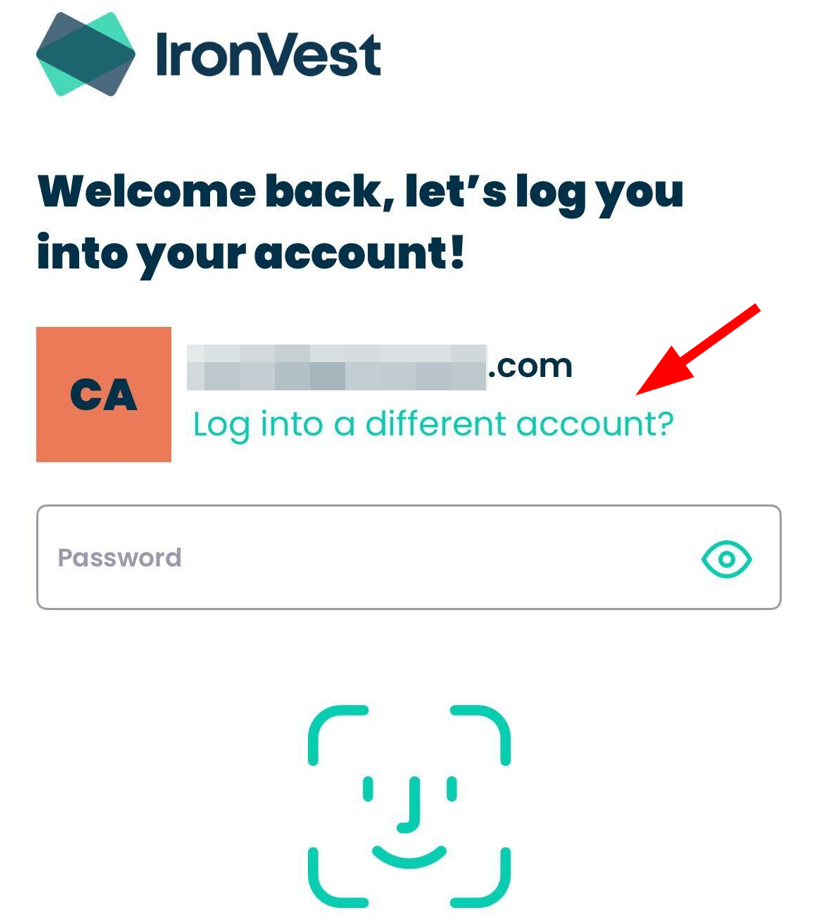
Proceed to manually enter your login credentials
On the new login screen, manually input your email address and password. Make sure to double-check for any typos or errors. Once you’ve entered your credentials hit the login button. You should now be able to access your account through the app.
Should you continue to experience login issues despite following these steps, please don’t hesitate to reach out to our dedicated support team at support@ironvest.com.
We acknowledge the frustration these technical glitches bring, but please know we are committed to providing you with the finest user experience.
Sincerely,
The IronVest Team