

Logo

How can we help you?

Find step-by-step guides, troubleshooting tips, and feature explainers to get the most out of our platform.

Where can I see messages sent to my Masked Emails?

Masked Emails

Where can I see messages sent to my Masked Emails?

Last updated on 23 Feb, 2026

You can view emails sent to your Masked Email via the IronVest temporary inbox: 

  1. Go to the Dashboard

  2. Click on the envelope icon next to Mobile devices on the top banner.
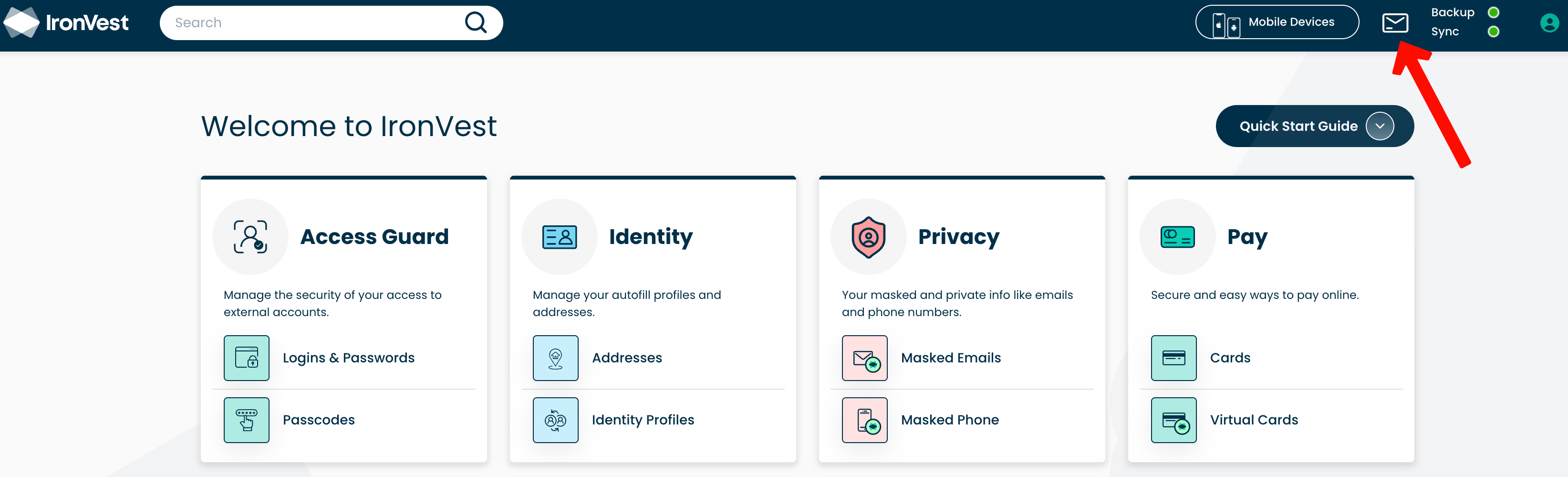
article-editor-upload_ef826dda-bf2f-49c8-87ba-95ce7eb8a799.png

You can also view the emails on your real email address inbox if they have been set to forward. All emails received to a Masked address will be marked "Masked" as you can see here:

Image

Did you find this article helpful?
Previous

How do I block a sender from sending me messages through one of my Masked Emails?

Next