

What’s New?
1. Require Password for Sensitive Data in Mini Dashboard
Users must now authenticate before viewing or copying passwords, card numbers, and secure notes in the Mini Dashboard. Authentication follows the Authorization Frequency setting and resets when the page is refreshed.
✅ Why? Enhances security while keeping access flexible.
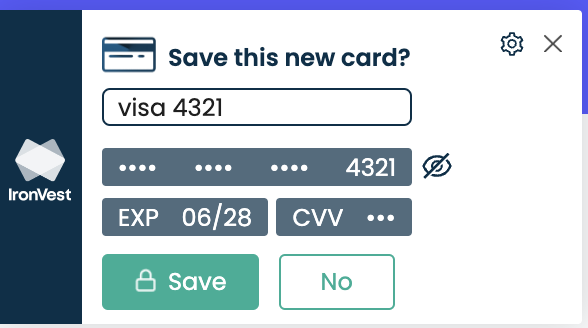
2. Save New Card Prompt After Checkout
After manually entering a card at checkout, a corner pop-up will ask if you want to save it for future use. Users can accept, dismiss, or disable the prompt in Settings.
✅ Why? Speeds up future checkouts while keeping control in the user’s hands.
3. New Mini Dashboard Icon & Improved Switch Panel
New Mini Dashboard icon added to all panels for quick access.
Redesigned Switch Panel UI with dropdown styling and repositioned elements for better navigation.
✅ Why? Makes switching between features faster and more intuitive.
4. Bug Fix: Last Used Data in Autofill
Fixed: Autofill menu now correctly tracks Last Used instead of Saved On to ensure recently used accounts appear first.
✅ Why? Provides more accurate login suggestions.
Rolling Out Gradually
This update will roll out automatically to all users. No action is needed—just continue using IronVest! 🚀